
IT Infrastructure provides the computing, storage, connectivity and supporting platforms that applications use. Hardware, software and networks are useful categories for understanding it, although they overlap. A firewall, for example, has both physical resources and software that enforces its rules.
IT Infrastructure hardware supplies computing and storage resources
Servers run applications, databases and shared services. A CPU executes instructions; RAM holds data and programs in active use. A GPU accelerates suitable parallel workloads, including some AI and graphics tasks, but is not required in every server.IT Infrastructure capacity planning starts with a diagnosis. More RAM may help a system short of memory, yet do little for an application waiting on slow storage. Extra CPU cores may sit unused if the software cannot use them effectively. Record the workload and the observed constraint before choosing an upgrade.
Storage keeps data when power is removed. Common arrangements include:
| Arrangement | How it presents storage | Typical use |
| Direct-attached storage | Drives attached directly to a host |
Boot volumes and local application data |
| Network-attached storage | Files available over a network |
Shared documents and file archives |
| Storage area network | Block storage over a storage network |
Shared volumes for databases and virtual machines |
Capacity alone does not describe storage performance. Latency, throughput, IOPS and resilience matter too. An archive and a busy database may hold the same amount of data but need quite different systems. Recovery requirements also influence the design.
Employee computers and mobile devices are part of IT Infrastructure. So are the racks, power, cooling and cabling needed to operate physical equipment. Spare capacity in a server does not imply spare power or cooling at the site.
IT Infrastructure software makes resources usable
The operating system manages processes, memory, files, drivers and network communication. Applications need compatible versions, while administrators need a plan for patches and support expiry.Virtualisation allows a physical host to run multiple virtual machines, usually with separate guest operating systems. Containers normally share a host kernel and package an application with its dependencies. These approaches can be combined, but they have different isolation and management implications.
| Consideration | Virtual machine | Container |
| Basic boundary | Virtualised hardware and a guest OS | Process isolation using a host kernel |
| What teams maintain | VM resources, OS and system images | Application images, runtime and deployment state |
| Selection questions | Guest OS needs and isolation requirements | Kernel compatibility and operational controls |
Databases, web servers, message queues and application runtimes provide further platform services. An order application might save records in a database and use a queue to send work to another system. Its ERP or CRM functions sit above those supporting services; this article uses that distinction rather than treating every application as an infrastructure component.
IT Infrastructure management software covers monitoring, configuration, patching, identity and backup. Buying the tools leaves operational decisions to make: who reviews an alert, which changes need approval and how a restore is tested.
IT Infrastructure networks connect the service to its users
Switches connect local devices. Routers forward traffic between IP networks, wireless access points provide Wi-Fi and firewalls apply traffic policy. Network interfaces, cables and optical transceivers complete the physical path.Other IT Infrastructure services make that path usable. DNS resolves names to addresses; DHCP supplies addressing settings. A VPN can provide protected remote or site-to-site connectivity over another network. Their availability and configuration need owners just as the equipment does.
Bandwidth is one measure of a connection. Latency, loss and routing also affect application behaviour. For offices in different Asia Pacific locations, test the paths people actually use to reach applications and data rather than judging the design from the nominal port speed.
Follow one transaction across IT Infrastructure
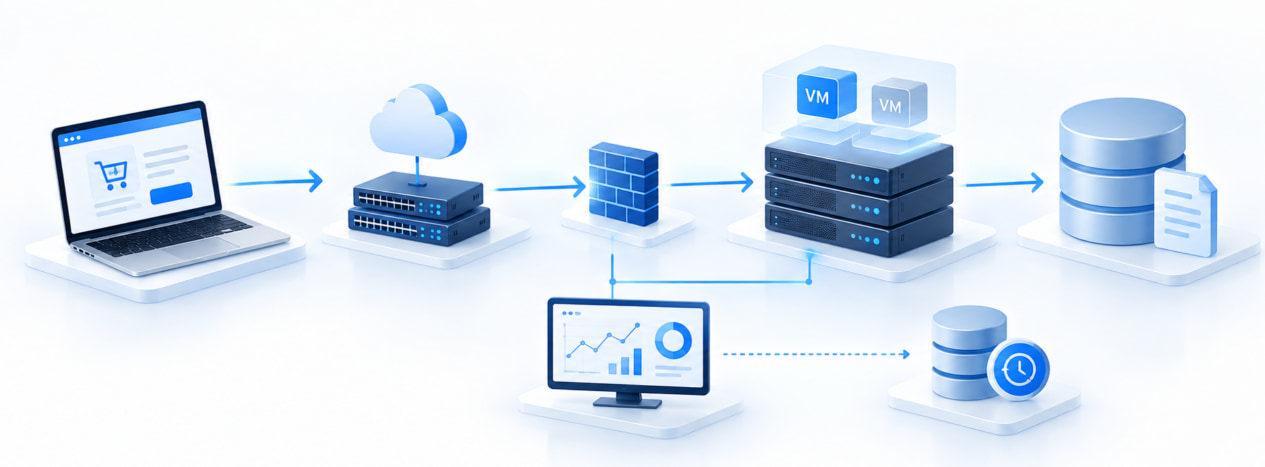
When an employee submits an order, the device sends a request over the network. Server resources and platform software execute the application, the database updates its records and storage retains them. The response returns to the employee. Identity controls govern access, while monitoring and backup support operation and recovery.The dependency chain helps with troubleshooting: compare affected and unaffected locations, then investigate what differs. Symptoms help prioritise tests; they do not prove the cause.
Cloud changes the division of IT Infrastructure work
On-premises systems, colocation and cloud services all use computing, storage and networks. What changes is who supplies and manages each layer. In IaaS, the customer commonly manages virtual machines, operating systems and applications. Managed platform and software services move more of that work to the provider, subject to the service terms.Cloud is therefore a delivery model, not simply another physical component. Keep a record of the resources you control, the responsibilities you retain and the provider that handles the rest.